Why sourcing takes so long
- Every role starts from zero. You write the posting, push it to job boards again and redo the searches. Meanwhile, suitable people sit unused in your files.
- A database where you can't find anything. Keyword search forces you to guess how each candidate described their job. Those who put it differently fall through the cracks.
- Profiles found, but never reached. An interesting profile only helps if the person is available and interested. Checking that still takes calls and follow-ups.
Sourcing with Delectus
- The role becomes the search. The job you describe is used directly as the query. No keyword strings to write.
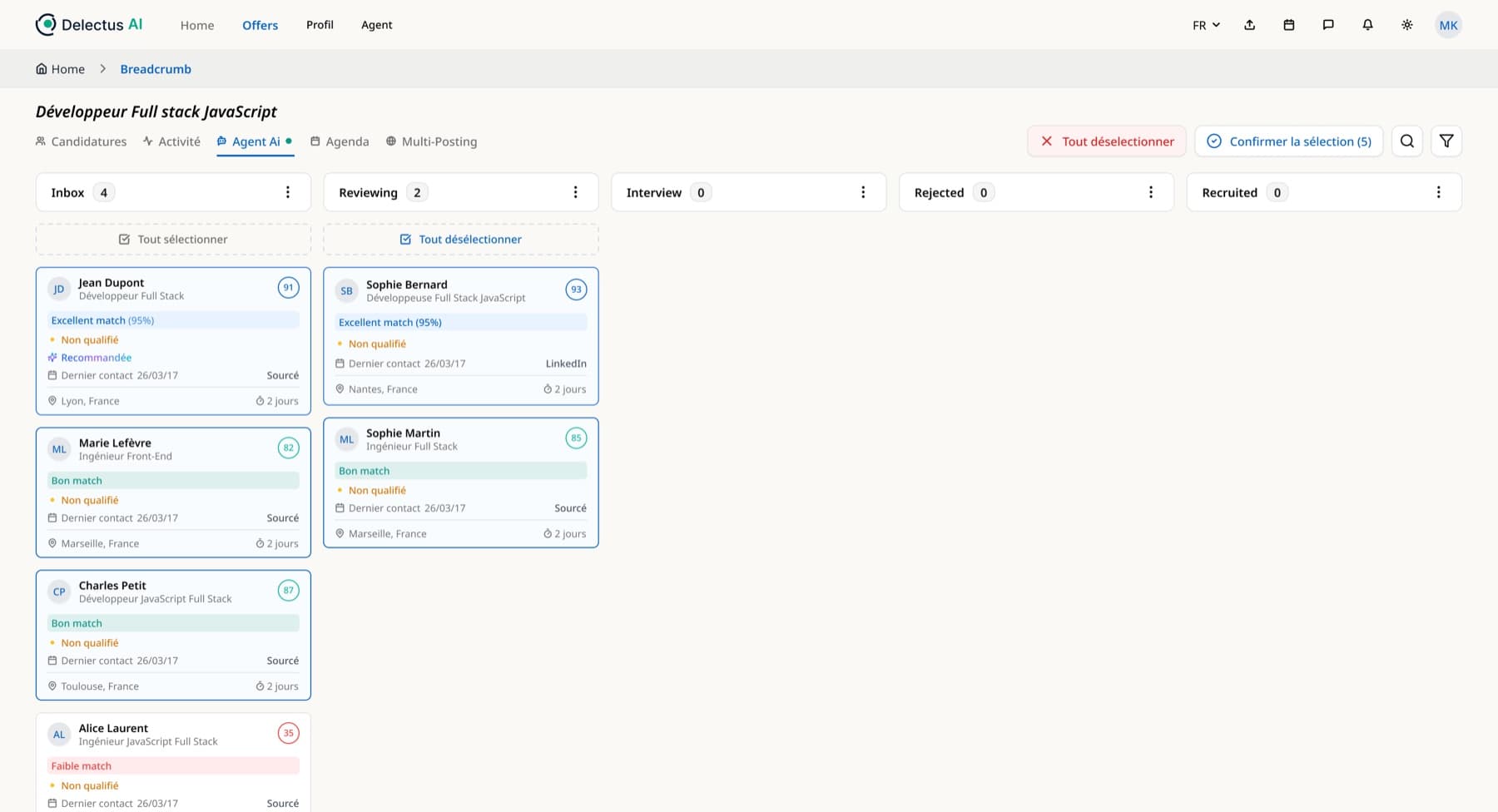
- Ranked, explained profiles. The candidates in your database closest to the role are suggested to you, each with their match score and its reasons.
- Outreach launched from the list. For the profiles you pick, the agent checks availability and interest by phone, text or WhatsApp.
Where candidate sourcing profiles come from in Delectus
Where the profiles the tool suggests come from, and when each source is most useful.
| Source | What the tool does | When to use it |
|---|---|---|
| Suggestions when a job is posted | Suggests past candidates close to the role, with score and reasons | For every new opening, even before the posting goes out |
| Plain-language search | Compares backgrounds rather than words, then narrows with filters | For a specific need or a hard-to-fill role |
| Imported resumes | Turns every resume into a structured, searchable profile | When you bring over the database from an old tool or a shared folder |
| Incoming applications | Analyzes every resume as it arrives and compares it to the role | Continuously, for as long as the job is open |
What is candidate sourcing with Delectus?
Candidate sourcing means actively looking for people for a role, beyond those who have just applied. With Delectus, that work starts where it's fastest: in your own database. Your candidate database and your ATS hold finalists you didn't hire, unsolicited applications and people you met for other roles. They already know your company, and you already know something about them.
The problem was never a lack of profiles, but how hard it is to find them at the right moment. That's what the tool fixes, by reading every resume, comparing it to your roles and suggesting the right people when a need opens up.
Suggestions as soon as the job is posted
When you post a job, the tool searches your database on its own for past candidates who match it. You get a list of profiles, each with a match score and its reasons, such as experience close to the role, a must-have skill found in the resume or a compatible location. A finalist from six months ago or a forgotten unsolicited application can make it back to the top of the pile.
These suggestions join the job's pipeline, next to incoming applications, and you compare everyone on the same criteria.
Searching your database in plain language
For a more specific need, you write the search the way you'd say it to a colleague, for example "multi-site payroll manager, Nantes area, comfortable with a software migration". The search compares jobs and backgrounds rather than words. Someone who described the same experience in other terms still comes up.
Filters then let you narrow the list by experience, skills or location. Every result opens a candidate profile with a summary, its strengths and gaps for the role, and the score broken down criterion by criterion.
Imported resumes that become profiles
A resume database is only useful if you can search it. Every resume that lands in your workspace, through a job opening or an import, is read by the AI and turned into a structured profile, with work history, skills, education, languages and location. Resumes from an old tool, a shared folder or your ATS join the same sourcing as new applications.
Reading a profile before reaching out
Before approaching someone, it's better to know why they interest you. The summary and the score breakdown tell you in a few lines. For a more specific question, the AI chat queries the profile for you. You can ask whether the person has worked in your industry or managed a team, and the answer is based on the resume.
The candidate profile also keeps a record of past exchanges, with your notes, tags, the salary discussed, notice period and activity history. If you saw the candidate a year ago, you know where you left off.
After sourcing, outreach by the agents
A rediscovered profile is only worth something if the person is available and interested. For the candidates you pick, the SMS prescreening agent sends a first message, says it's an AI and asks for the candidate's consent, then asks the job's questions. The conversation can also happen on WhatsApp.
With no reply after two follow-ups, the voice prescreening agent calls. If the person still can't be reached, you're notified and take over. When the answers fit, the agent offers a meeting in your actual free slots, thanks to the calendar synced with Outlook and Teams.
Tracking your sourcing in the pipeline
Sourced profiles move through the job's kanban like any other candidate. You see at a glance who has been contacted, who replied, who is in prescreening and who has an interview. A notification tells you as soon as a candidate replies, and you can assign a task to a colleague, such as calling someone back or reviewing a profile, without leaving the tool.
Profiles suggested when the job was posted, those found through a plain-language search and applications received directly all sit together and are compared on the same criteria.
Passive vs. active sourcing: what's the difference?
Active sourcing targets candidates who are looking for a job and answer postings. Passive sourcing targets people who are employed, aren't looking, but might be interested in a good offer.
Your own database mixes both. It holds people who were looking when they applied and whose situation may have changed since. That's why the agent's outreach starts by checking interest and availability before discussing the role in detail.
Mistakes that slow sourcing down
A few mistakes come up often, even with a good tool.
- Starting the search before agreeing on the role's criteria with the hiring manager
- Searching for exact keywords instead of describing responsibilities and skills
- Forgetting candidates you've already met and going straight back to job boards
- Letting several days pass between a positive reply and the next step
Frequently asked questions
What is candidate sourcing?
It's actively searching for candidates for a role, beyond the people who applied. It can be done in your own database, on job boards or on professional networks. Delectus focuses on your database.
Does Delectus search LinkedIn?
No. It searches your own data, meaning your candidate database and your ATS, where the candidates you already know are.
How long does it take to get profiles?
Suggestions appear as soon as the job is posted, based on the resumes already in your database.
What's the difference between sourcing and recruiting?
Sourcing is the step where you identify potential candidates. Recruiting covers the whole process, from sourcing to hiring, including screening and interviews.
Do I need to write Boolean queries to search my database?
No. You write what you're looking for in everyday language, and the search compares backgrounds rather than words. The experience, skills and location filters then help you narrow it down.
How do I reach out to sourced candidates?
From the job's pipeline. The SMS prescreening agent writes to them by text or on WhatsApp, and the voice prescreening agent calls them if the messages go unanswered.
How do you source candidates for a hard-to-fill role?
Start with your database, describing the role by its responsibilities rather than a precise job title, to surface adjacent backgrounds. Read the summaries of the closest profiles, then have the ones you like contacted quickly. On a rare profile, speed often makes the difference.